
Last Updated: 2 March 2026
Key Takeaways
- The Design: An ultra-thin footprint measuring just 11 mm at its thinnest point, complete with a premium brushed aluminium frame.
- The Switches: Features Cherry MX Ultra Low Profile mechanical switches for a highly satisfying, tactile typing experience.
- The Performance: Offers 8000 Hz hyper-polling when wired, or lightning-fast Slipstream wireless connectivity for a clutter-free desk.
- The Battery: Enjoy up to 200 hours of battery life with the RGB lighting disabled, or up to 50 hours with full illumination.
Welcome back to another Gaming Focus! Today we are looking at an absolute beast of a peripheral. As we sit here in March 2026, the premium keyboard market is more crowded than ever. However, the Corsair K100 Air RGB Wireless still stands out as one of the most impressive pieces of tech to ever grace my desk.
If you have been looking for an ultra-thin, high-performance keyboard that provides the best experience possible whether you are gaming, editing, or typing up a storm, this is exactly what you need.
Slimmed Down, Not Watered Down
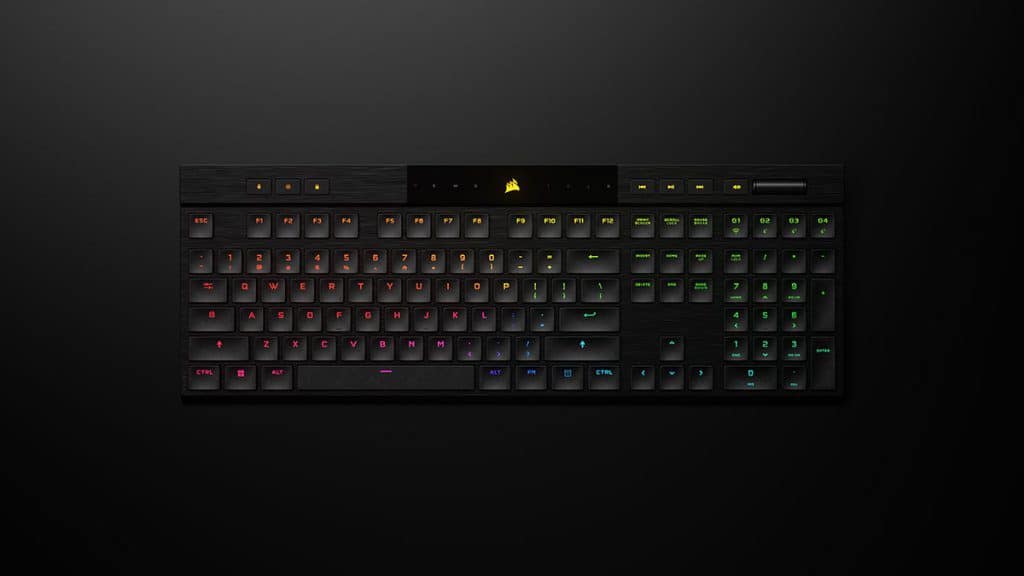
The Corsair K100 Air is a mechanical gaming keyboard that has been completely slimmed down without reducing any of its core functionality. It has all the usual flagship features you would expect, including an elegant brushed aluminium frame and highly satisfying RGB lighting.
It stands out from Corsair’s other heavy-duty keyboards thanks to its elegant design. It boasts ultra-thin dimensions of just 11 mm at its thinnest point, making it sit incredibly flush against your desk.
The Switches: Cherry MX Ultra Low Profile
The previous flagship, the Corsair K100 RGB, used OPX optical-mechanical key switches. The K100 Air takes a completely different approach. To achieve that incredibly slim footprint, Corsair utilised Cherry MX Ultra Low Profile mechanical switches.
These are brilliant tactile switches that use a clever internal spring mechanism to provide satisfying feedback and highly reliable keystrokes. It is a fantastic combination for both fast-paced gaming and everyday leisure activities. If you are currently shopping for a luxury gift idea for a PC enthusiast, the unique feel of these switches alone makes it a top-tier choice.
Wireless Connectivity and Battery Life
As a premium wireless device, the K100 Air connects to your PC via Corsair’s dedicated Slipstream wireless USB receiver or via standard Bluetooth. Both options deliver a fast, responsive typing experience without any noticeable lag.
If you want to step away from your phone to beat notification anxiety and just lose yourself in a single-player game, the wireless freedom is brilliant. Corsair claims you can get up to a massive 200 hours of battery life with the RGB off or around 50 hours with the lighting fully turned on.
Alternatively, when you have it wired in via USB, you can make the most of the 8000 Hz hyper-polling technology for pinpoint competitive accuracy.
Macros and Customisation
The K100 Air is sure to impress in other areas too. With up to 20 layers of RGB lighting customisation available, you can also store as many as 50 macros directly in the 8MB of onboard memory. Furthermore, you can make the most of four dedicated macro keys located just above the numpad, which are perfect for streaming shortcuts.
Overall, it is an incredible piece of kit. Pour yourself a glass of your favourite Imperial Stout, sit back, and enjoy one of the sleekest typing experiences money can buy.
FAQ: Corsair K100 Air RGB Wireless
What is the battery life of the Corsair K100 Air? If you turn the RGB lighting completely off, you can expect up to 200 hours of wireless use. If you prefer to keep the RGB lighting on, the battery will last for approximately 50 hours before needing a recharge.
Are the Cherry MX Ultra Low Profile switches loud? They provide a distinct, satisfying tactile click. They are definitely louder than standard rubber membrane laptop keys, but they are generally quieter and less “clacky” than full-sized traditional mechanical blue switches.
Can you use the Corsair K100 Air wired? Yes! You can plug it in via the included USB-C to USB-A cable to charge it while you play. Using it in wired mode also unlocks the ultra-fast 8000 Hz hyper-polling feature.
